
Atlas on ChartLabs
Atlas is the AI copilot built into ChartLabs. Ask it in plain English to add EliteAlgo ONE or Smart Money Concepts, change their settings, or explain what is on your chart. It can mark levels and set alerts for you. It never places trades. Every order is yours.
Atlas and EliteAlgo ONE both live on ChartLabs, our own charting platform.
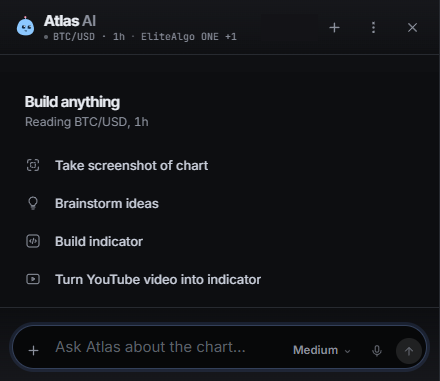
Open it
On any ChartLabs chart, open the Atlas panel and type into the box that says Ask Atlas about the chart.
Atlas sees what you see: the symbol, the timeframe, the recent candles, the indicators on your chart and their settings, and anything you have drawn. So you can ask about the chart in front of you without explaining it first.
Add and set up your indicators
Just ask. For example:
- "Add EliteAlgo ONE."
- "Add Smart Money Concepts."
- "Put EliteAlgo ONE on Smart Signals."
- "Turn on order blocks for Smart Money Concepts."
- "Turn on the trend cloud."
Atlas only changes settings the indicator really has. If you ask for something that is not a setting, it will say so. Atlas also cannot unlock ONE for you. If your account does not have access yet, see how to get it.
Have it explain the chart
Once your indicators are on, try:
- "What is on this chart?"
- "What was the last break of structure?"
- "Which mode is EliteAlgo ONE on?"
- "Are the order blocks on?"
Atlas explains what the indicators drew. The signals and the structure come from the indicators themselves. If Atlas and a label on the chart ever disagree, trust the label on the closed candle and ask again.
Levels, alerts, and backtests
Atlas can draw a level or a zone, set a price alert, or watch for the next EliteAlgo signal. It can switch the symbol, timeframe, or chart type, and open the backtester. On desktop it can even build you a new indicator from a description.
If it starts doing more than you asked, hit Stop.
What it will not do
- It never places, changes, or closes a trade.
- It will not tell you how much to risk or that you have to take a trade.
- It can be wrong about a price or a level. Check the chart before you act.
A simple routine
- Ask Atlas to add EliteAlgo ONE and Smart Money Concepts.
- Pick the ONE mode you want: All Signals, Smart Signals, or Confirmed.
- Ask what the last break was, then check it against the chart.
- Ask for an alert on a price or on the next signal.
- Make your own decision.
Trading involves risk
Atlas gives educational chart analysis, not financial advice, and you decide your own trades. Trading can lose money.