
Smart Money Concepts
Smart Money Concepts maps the market structure for you, so you do not have to draw it by hand. It shows where the trend broke and kept going, where it first turned the other way, and where price swept a high or a low and snapped back. Everything prints after the candle closes.
Order blocks and fair value gaps are in there too. They start off, so the chart stays clean until you want them.
Built for ChartLabs
Smart Money Concepts is the companion to EliteAlgo ONE. Both live on ChartLabs, our own charting platform.
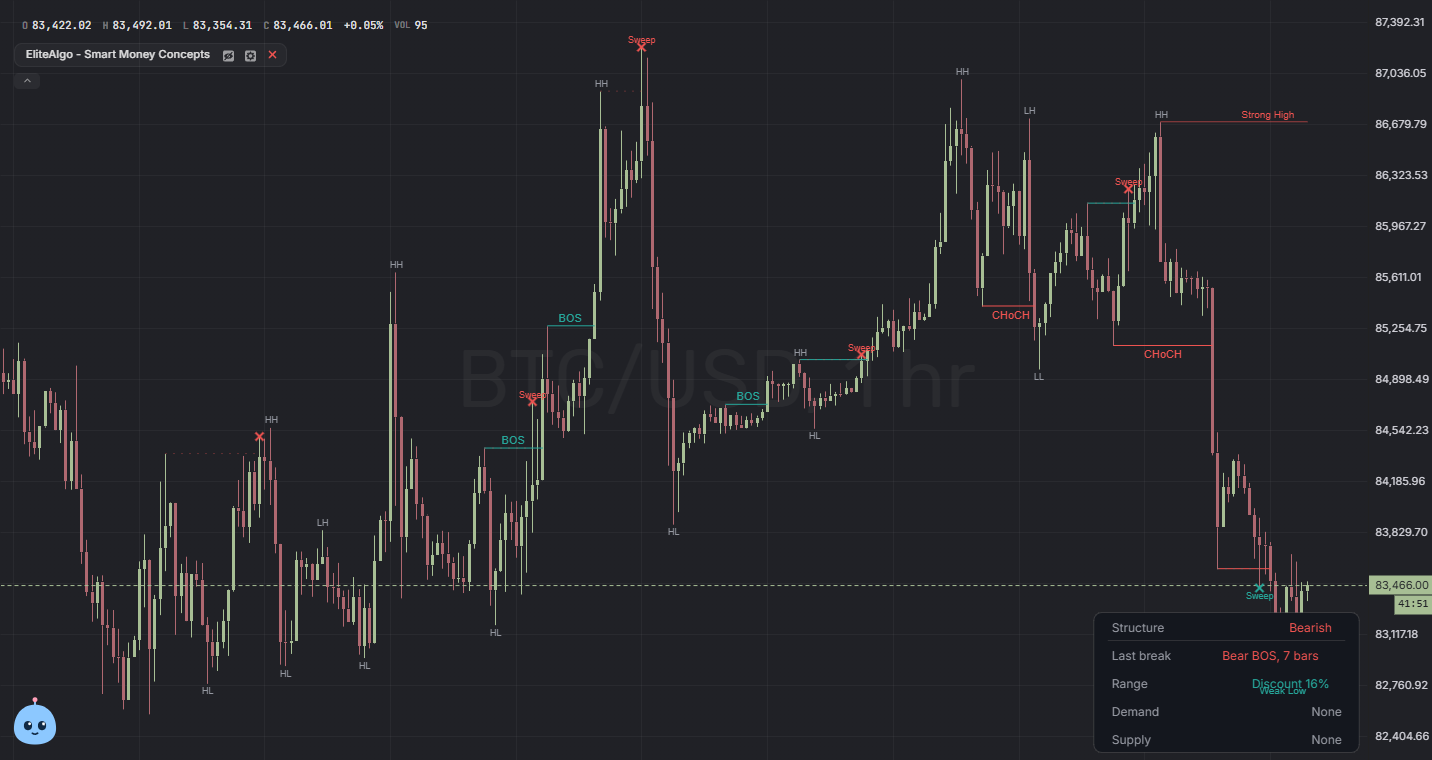
What it draws
- Breaks of structure (BOS). The trend pushed past its last swing and kept going.
- Changes of character (CHoCH). The first close the other way. Often the earliest hint that a trend is turning.
- Sweeps. Price poked through a prior high or low, then closed back inside. Tiny one-tick pokes do not count.
- Swing labels. Higher high, lower high, higher low, lower low (HH, LH, HL, LL), plus the strong and weak ends of the current range.
- Order blocks and fair value gaps (off by default). The zone a strong move started from, and the gaps price left behind. A zone disappears once price closes through it.
It draws the map. It does not give buy or sell signals. That is what EliteAlgo ONE is for.
Add it to your chart
- Open a chart on ChartLabs.
- Click Indicators and open the Elite tab.
- Click EliteAlgo - Smart Money Concepts.
Smart Money Concepts is free for everyone; some advanced options need EliteAlgo. Those are listed below.
Settings at a glance
- Structure history. How much of the trail to keep: just the latest break, the recent ones (the default), or all of them.
- Swing length. How big a swing has to be before it counts. Higher follows bigger swings and confirms them later. Lower picks up smaller swings sooner.
- Swing labels and strong and weak highs. On by default.
- Liquidity sweeps. On by default.
- Order blocks and fair value gaps. Off by default. Choose whether a zone clears on a close or on a wick through it, and how many to show. Free charts show up to 3 of each, EliteAlgo charts up to 5.
What EliteAlgo members get
These need EliteAlgo. On a free account they show as locked, with a way to upgrade. The ChartLabs iOS and Android apps hide them. All of them start off except the dashboard.
- Internal structure. The smaller swings inside the main ones, drawn dashed.
- Breaker blocks and inversion gaps. Zones price has already broken through, flipped to the other side.
- Equal highs and lows. Two swings at almost the same price, where stops tend to sit.
- Previous day and week. Last day's and last week's highs and lows on intraday charts.
- Premium and discount. Whether price is in the top, middle, or bottom of the current range.
- Dashboard. Trend, last break, range position, and the nearest zones in one small panel.
- Trend candles and alerts for new breaks and sweeps.
Use it with EliteAlgo ONE
The two are made to sit on the same chart. ONE tells you when there is a signal. Smart Money Concepts shows you the structure around it, like the sweep of a low or the break of a high that came right before a buy.
If both are on, leave ONE's own Elite Order Blocks off so you only see one set of boxes.
You can also ask Atlas to add Smart Money Concepts, turn on the order blocks, or tell you what the last break on the chart was.
Trading involves risk
The zones show where price did something. They are not proof of big orders, and they do not tell you where price goes next. Trading can lose money, and nothing here is financial advice.